Model guide
What Is FLUX 3?
FLUX 3 is the multimodal foundation model from Black Forest Labs (BFL), announced on July 23, 2026. Unlike earlier FLUX models that focused on images, FLUX 3 learns from images, video, and audio inside one architecture — so it can generate clips up to 20 seconds long with dialogue, sound effects, and music created natively alongside the picture.
This guide covers what each FLUX 3 capability does, how the Self-Flow training approach works, how FLUX 3 compares with today's leading video models, and how the staged rollout unfolds — plus where to try Flux 3 video generation with native audio.

FLUX 3 at a glance
- Developer
- Black Forest Labs (BFL), the German frontier lab behind the FLUX family
- Announced
- July 23, 2026, with capabilities rolling out through phased early access
- Modalities
- Image, video, native audio, language, and action prediction in one model
- Video length
- Up to 20 seconds per generation, chainable into longer multi-shot sequences
- Audio
- Native audio generated with the frame: multilingual dialogue, effects, and music
- Inputs
- Text prompts, start images, visual references, keyframes, and existing video or audio
- Availability
- FLUX 3 Video and Action in early access now; Image follows in the coming weeks
- Open weights
- An open-weight multimodal backbone, FLUX 3 Dev, is planned for a later release
One model, four product lines
Every FLUX 3 capability is built from the same underlying multimodal flow-matching model, and each ships after its own early access phase.
FLUX 3 Video
Early accessText to video, image to video, video to video, and keyframe-controlled transitions — with native audio generated in the same pass. Single generations run up to 20 seconds, and agentic chaining links clips into longer multi-shot stories with consistent characters and style.
FLUX 3 Image
Coming weeksImage synthesis and editing across styles, compositions, aspect ratios, and resolutions. Early results show stronger complex-prompt handling, more accurate multilingual text rendering, and better editing performance than earlier FLUX generations.
FLUX 3 Action
Partner accessThe same foundation applied to physical AI: predicting how actions reshape a scene. FLUX-mimic, built with mimic robotics, already drives dexterous robot manipulation tested in production environments at Audi.
FLUX 3 Dev
PlannedAn open-weight multimodal backbone for content creation and action prediction, continuing BFL's tradition of pairing frontier capability with open access. Timing and license details are still to be announced.
How Self-Flow makes it work
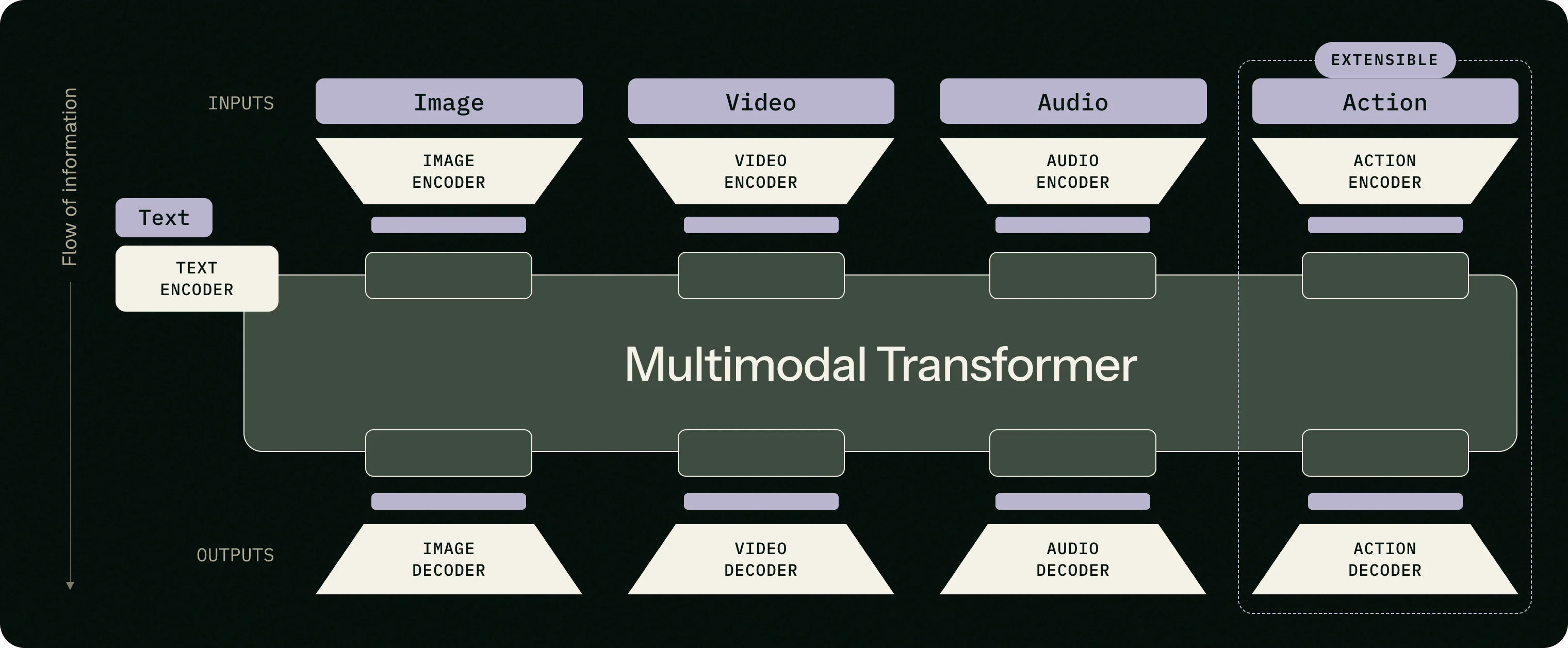
FLUX 3 builds on Self-Flow, BFL's approach for aligning multimodal generation and understanding within a single architecture. A multimodal transformer converts images, video, and audio into one shared internal representation, then turns that representation back into output. Trained this way, the model learns how scenes hold together, how objects move, and which sounds belong to which physical events.
That is why the audio is native rather than dubbed on afterwards: picture and sound come out of the same generation, so footsteps land on frames, lips match dialogue, and ambience follows the camera. Video prediction accounts for over 95% of FLUX 3's training compute — which is also what lets the same backbone extend to action prediction for robotics without losing its creative abilities.
How FLUX 3 compares
In BFL's announcement, viewers compared 10-second 720p text-to-video clips with native audio head-to-head. The numbers show how often they preferred FLUX 3 over each competing model.
vs Luma Ray 3.2
93%
vs Runway Gen-4.5
77%
vs Grok Imagine Video
69%
vs Kling v3 Pro
60%
vs Happy Horse v1
59%
vs Happy Horse 1.1
57%
vs Seedance 2.0
52%
vs Gemini Omni Flash
52%
Figures come from Black Forest Labs' internal evaluation of a development-stage FLUX 3 candidate. Sample size, evaluator count, and full methodology have not been published, so treat them as an early signal rather than a final benchmark; BFL says complete results will follow at general availability.
FLUX 3 FAQ
See FLUX 3 in motion
Reading about a video model only goes so far. Open the Flux 3 video generator, write a prompt or drop in an image, and get a cinematic clip with native audio — or browse the official demo reel first.