AI Video Generators with Native Audio (2026)
What native audio means in AI video, which tools actually ship sound with the picture, and where Flux 3 Video fits if you need dialogue and ambience in one pass.
 Flux 3 Video Team
Most “AI video” demos are silent. You get motion, then you open another app for voiceover, Foley, or stock music. That workflow is fine for explainers. It falls apart when the sound has to match the impact on screen.
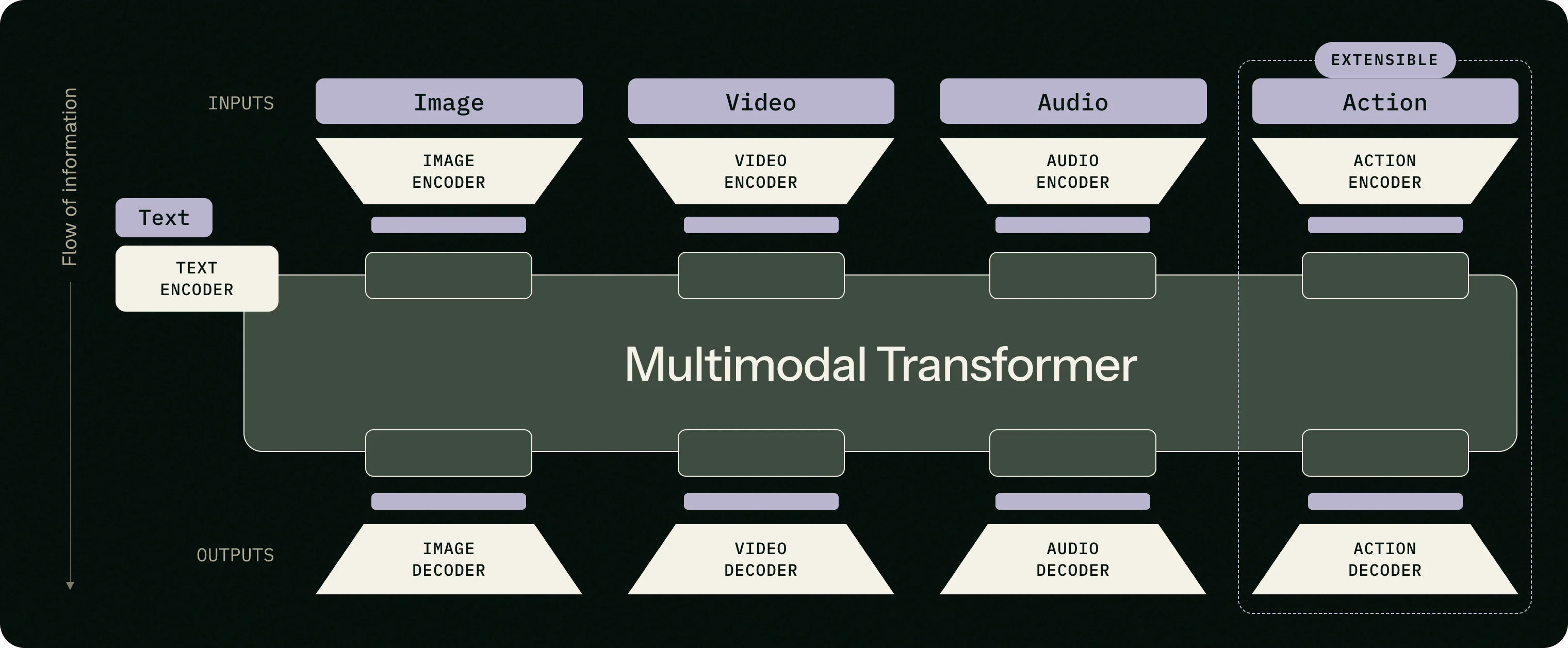
Native audio means the model generates picture and sound together. Dialogue lipsync, footsteps, rain, room tone — baked into the same clip. If you have been searching for an AI video generator with native audio, that is the distinction that matters.
Why native audio changed the shortlist
Until recently, “best AI video generator with audio” usually meant: generate muted video, then run TTS. A few 2025–2026 models flipped that. They train on video and audio in one stack, so the soundtrack is not an afterthought.
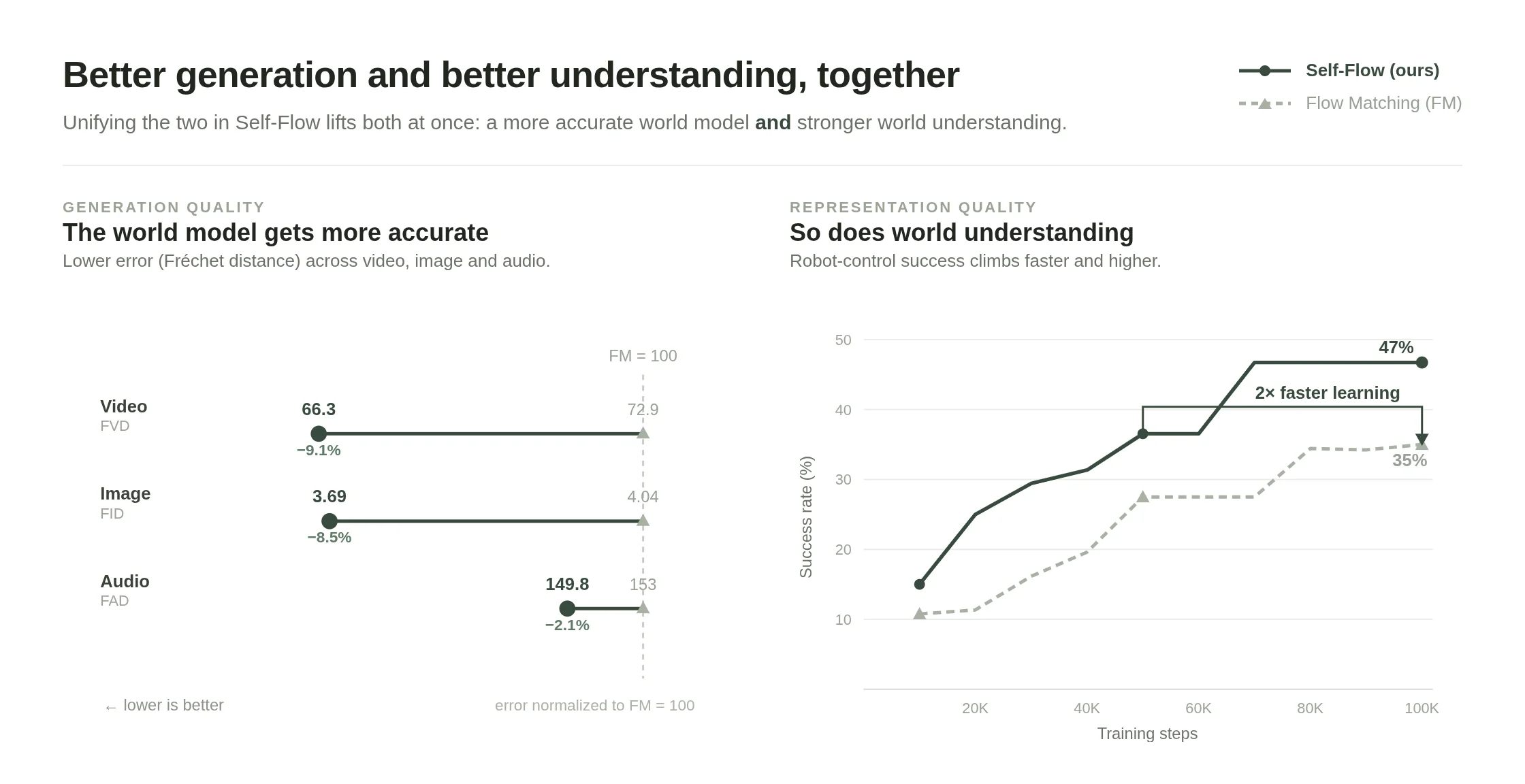
BFL’s Self-Flow work is a clear example: generation quality improves across video, image, and audio when understanding and generation share the same backbone — not when sound is bolted on later.
What to check when you compare tools:
- Does audio come out in the same render as the video?
- Can characters speak more than one language without a separate TTS step?
- Are ambience and effects tied to what is on screen, or is it a generic bed?
- How long is a single clip, and can you chain shots without breaking the sound world?
Silent-first tools still win on some jobs (template ads, talking-head avatars with a scripted voice). For cinematic or social clips where the scene is the sound, native audio is the shorter path.
What sits in the “with audio” bucket today
This is not a scored ranking. Categories shift fast. Treat it as a map.
| Approach | What you get | Watch-outs | | ------------------------------------------- | ------------------------------------------------------------ | ------------------------------------------------- | | Multimodal models (e.g. FLUX.3-class video) | Picture + synced sound in one pass | Early access; clip length caps | | Studio apps that wrap several models | Pick Kling / Veo / Sora-style backends, sometimes with audio | Quality and audio support vary by model | | Avatar / TTS-first platforms | Clear speech over slides or a presenter | Weak for diegetic world sound | | Audio-to-video tools | Drive visuals from a podcast or track | Different intent than “prompt → scene with sound” |
ElevenLabs, Canva, HeyGen, InVideo, and Magic Hour all show up for “AI video generator with audio” searches. Some of those pages mean TTS-on-top. Read the feature list before you assume native sync.
Where Flux 3 Video sits
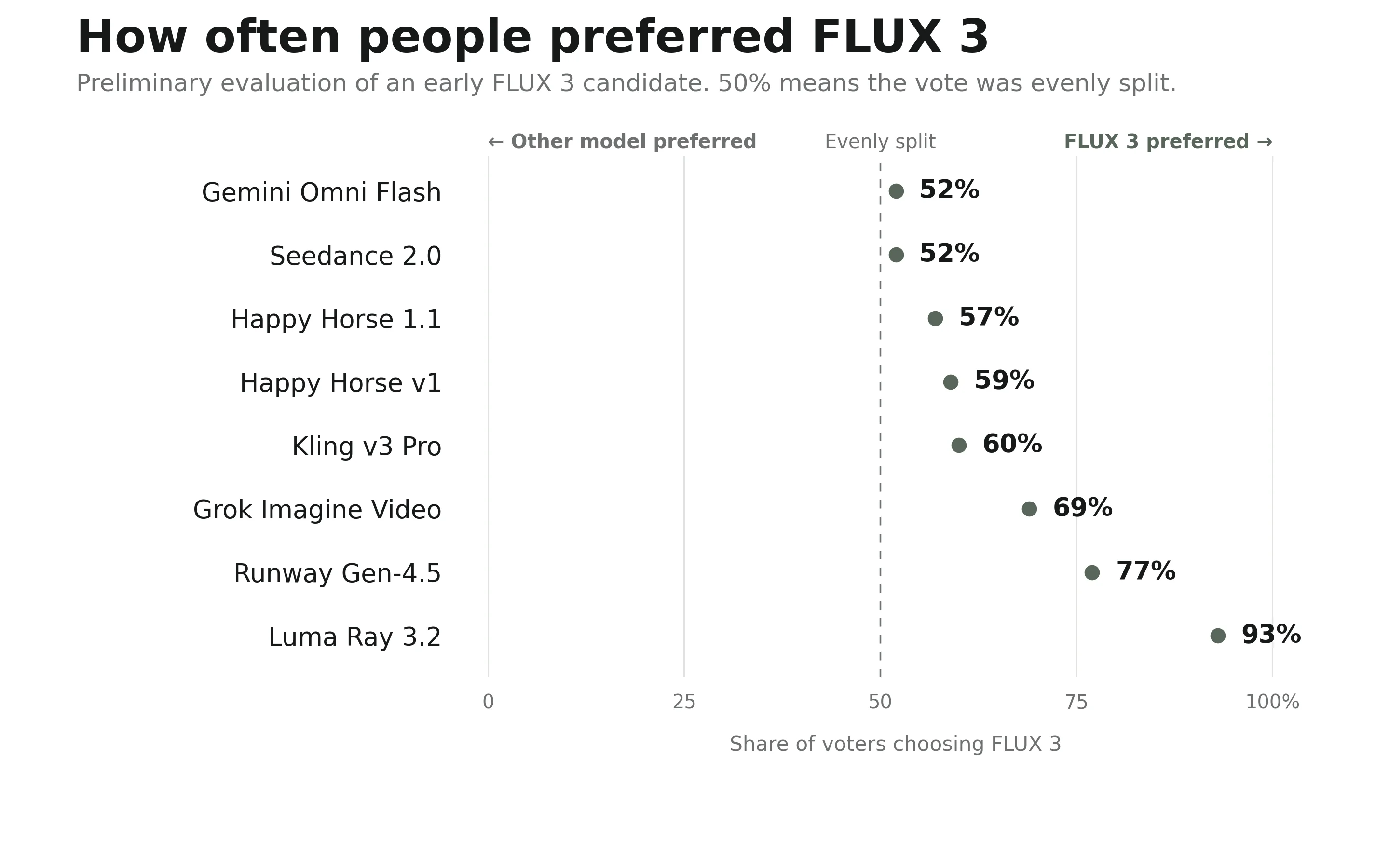
Flux 3 Video is a Flux 3 video generator built around FLUX.3’s multimodal training. The product pitch is deliberately narrow: text or image in, short cinematic clip out, with native audio — not a timeline editor, not an avatar studio.
Practical limits today:
- About 20 seconds per generation (chain shots for longer pieces)
- Text-to-video, image-to-video, and reference video flows
- Multilingual dialogue when the scene calls for speech
- Studio launch is rolling out; free trial details land with the product, not as a fake “100% free forever” claim
If your search was closer to Flux 3 video maker or Flux 3 video with audio, that is the same tool: one generator page, same model, sound optional per job but designed to ship with the frame.
When to pick something else
- You need a 10-minute course video with a stable presenter face → avatar + TTS platforms still fit better.
- You only need captions on a slideshow → lighter editors win on speed and price.
- You need open-weights local inference → look at research / ComfyUI stacks, not a hosted Flux 3 front-end.
Try it
Open the Flux 3 AI Video Generator, write a shot with weather, footsteps, or a line of dialogue, and keep audio on. That single prompt is the fastest way to see whether native audio is what you actually wanted — or whether a silent clip plus a voiceover still suits the job.
Related reading: Introducing FLUX 3 Video. Charts and diagrams above are from Black Forest Labs’ FLUX 3 announcement.